New release

Auto-translate is now available. Use AI to translate supported WildApricot system labels, included in every subscription.

See where AI fits

Make WildApricot multilingual without rebuilding your site.

Apricot Translate handles two jobs cleanly: it shows the right language-tagged Content Gadgets that your team creates, and it lets admins translate WildApricot-generated menus, forms, directories, and other built-in interface text from an in-page inspector.

New Auto-translate WildApricot system labels with one click. Auto-translate drafts translations for supported WildApricot-generated text using AI, while your team stays in control of review, edits, and final save. Available at no additional cost.

Works on top of existing WildApricot sites AI only where it actually helps Translations stay on your site
Two tools in one

Toggle between language-tagged Content Gadgets and use an interface for managing and translating site menus and WildApricot-generated system labels.

Admin control

Your team still reviews copy, places gadgets, and commits saved translations from inside WildApricot. Only Full Administrators can save modifications.

You own your translations

All translations are stored directly on your website and are yours to take with you if you cancel your subscription.

What it translates

Two translation categories. One plugin.

Apricot Translate helps you manage your self-translated content gadgets as well as provide an interface for translating site menus and hard-coded system label either manually or via AI.

Category 1

WildApricot-generated text

This is built-in interface text generated by WildApricot itself, such as menu items, membership application text, directories, and gadget labels.

AI auto-translate available
How it works
  • The Apricot Translate inspector lets admins select a gadget and enter translations for each configured language.
  • The translation window is designed for WildApricot-generated text that cannot be managed as regular Content Gadget content.
  • Changes are reviewed in place before admins save and commit them.
Where AI fits
  • Auto-translate can draft translations for supported WildApricot-generated text inside the inspector.
  • Admins stay responsible for reviewing wording, terminology, and final save.
  • The goal is faster translation work for generated interface text, not hands-off site localization.
Give your WildApricot site a multilingual workflow that is actually clear.

Use language-tagged Content Gadgets for your own content, the inspector for WildApricot-generated text, and AI only where it makes sense.

Workflow

A production workflow for real WildApricot sites.

Setup stays lightweight, but the workflow is explicit: configure languages, tag your own content by language, then use the inspector for WildApricot-generated text and optional AI drafts.

1 Configure

Install the script and choose languages

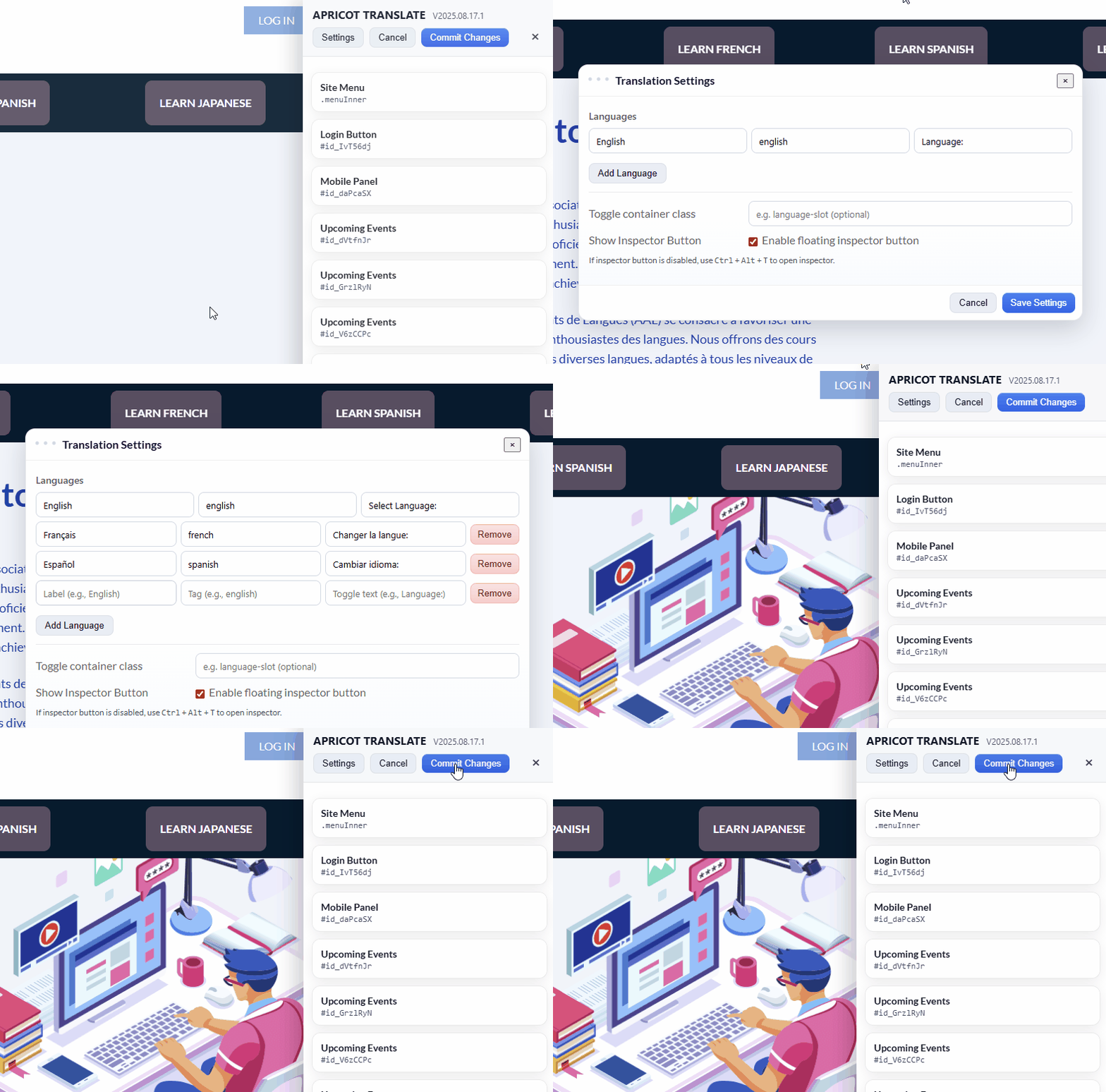
Add one script in WildApricot, whitelist the domain, then define each language you want to offer in Apricot Translate.

Choosing languages in Apricot Translate
2 Content Gadgets

Tag each language version of your own content

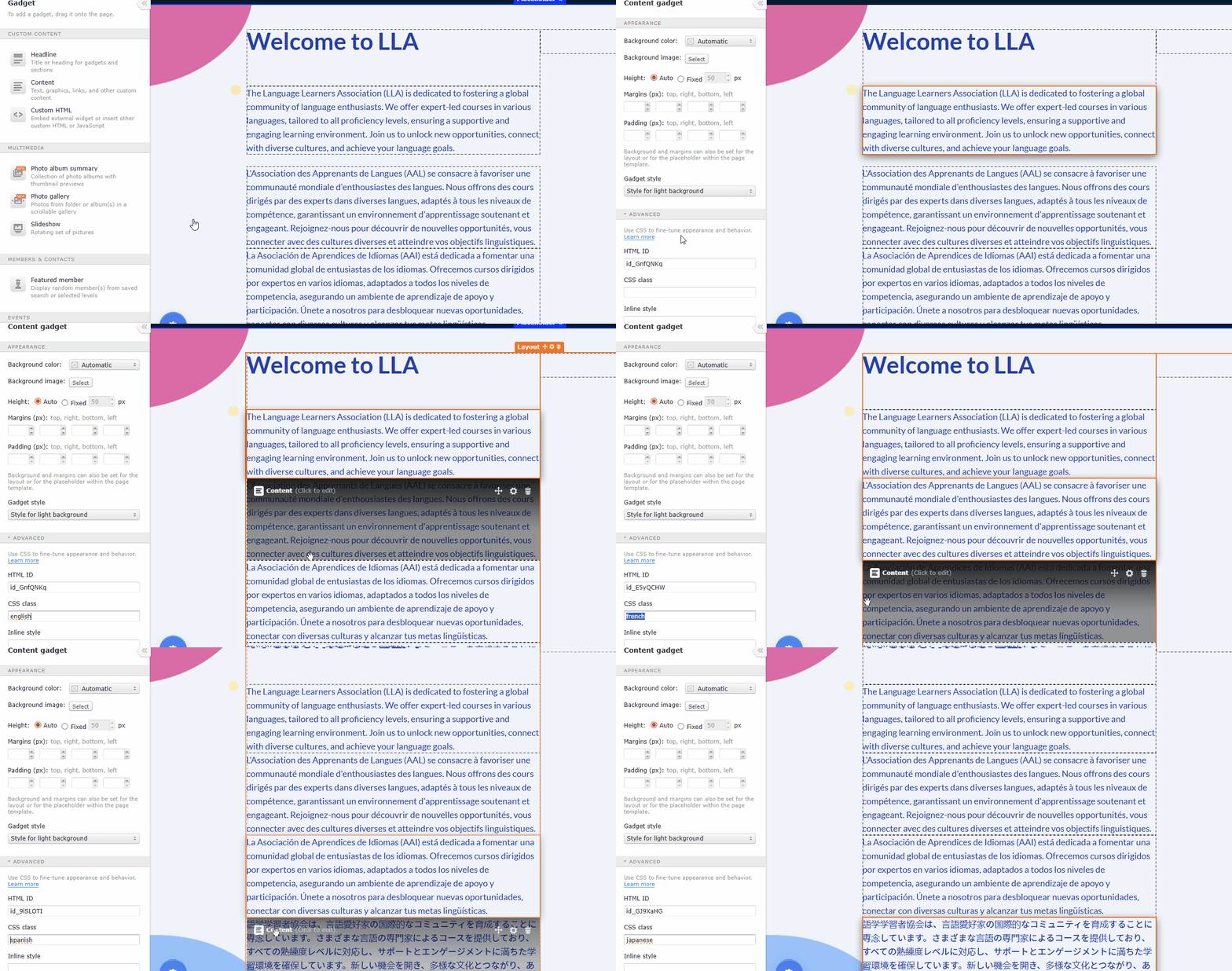
Create the Content Gadget for each language, assign the correct language tag CSS class in Advanced settings, and let the switcher show the matching version.

Applying language tags to WildApricot content gadgets
3 Generated text

Translate WildApricot-generated text in place

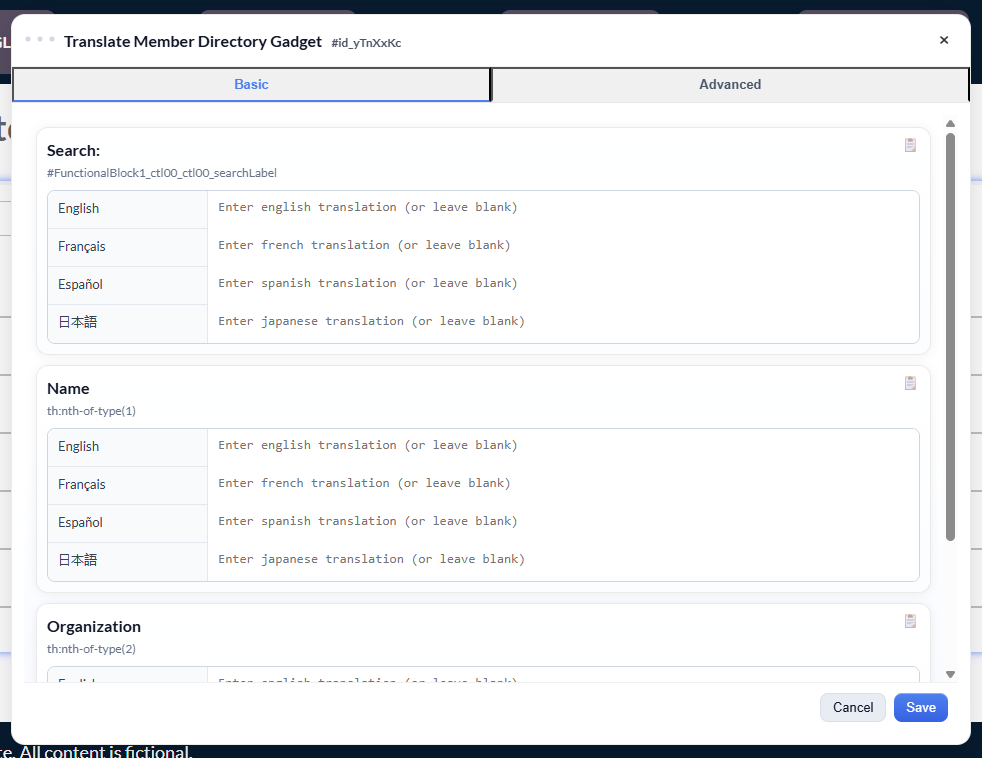
Open the inspector, select the gadget or menu you want to translate, then enter translations manually or use Auto-translate and Translate All as a draft starting point.

Apricot Translate basic inspector translation view
Included

What you get in the plugin, beyond the headline.

The goal is not just translation. It is a multilingual WildApricot workflow that remains manageable after launch.

Language switcher for visitors

Offer clean language switching on the front end and place the switcher where it fits your WildApricot layout.

AI-assisted generated-text translation

Draft translations faster for supported WildApricot-generated text without pretending AI replaces your content workflow.

Works with existing themes

Keep your current WildApricot theme or custom design. Apricot Translate layers on top instead of forcing a rebuild.

Translations remain yours

Translation data is stored on your website, so you retain ownership of the work even if your subscription changes later.

Pricing

US$60/year

One plan for multilingual switching, the in-page inspector, advanced rules, and AI auto-translate for supported WildApricot-generated text.

Included
  • Unlimited languages
  • Language-tagged Content Gadget switching
  • Inspector for WildApricot-generated text
  • Auto-translate menus and system labels
  • Advanced find-and-replace and regex rules
Before you subscribe
  • Content Gadgets still need to be created and translated by your team in WildApricot.
  • AI applies to supported WildApricot-generated text inside the inspector, not every piece of content on the site.
  • Taxes may apply where required.
Need help with setup? Email hello@ansidmedia.com .

Subscribe to Apricot Translate

US$60/year. Secure checkout by Stripe.

Read the documentation

Already subscribed?

We will email you a secure link to manage your subscription. No login required.